.png)


.png)
Most clients understand they need to stay active on social media.
They want a consistent brand presence, timely posts, polished content, community engagement, and proof that social is supporting their broader marketing efforts.
Agencies understand the value too. The harder part is turning that need into a profitable, repeatable service.
For many agencies, social media management has become one of the most operationally difficult services to scale profitably. It requires strategy, writing, design, brand understanding, scheduling, approvals, reporting, and ongoing account management. Multiply that across 10, 25, 50, or 100 clients, and the work quickly turns into a production treadmill.
At Cloud Campaign, we have always believed agencies should be able to scale without giving up the things that make them valuable in the first place: strategy, creative direction, client relationships, campaign planning, and thoughtful execution.
That belief is why we built Cloud Campaign.
And it is also why we built CloudStudio.
CloudStudio is our next step toward helping agencies compete in a world where the way marketing work gets done is changing quickly.
It is not just an AI content generator. It is not a generic prompt box. It is not a replacement for agency judgment.
CloudStudio is an AI-assisted social media fulfillment layer built directly into Cloud Campaign, designed to automate the busywork of social content production while giving discerning agencies the control, structure, and quality safeguards they need to confidently deliver content for real clients.
It sits in an important middle ground.
On one side, there are standalone AI tools. They are powerful, flexible, and increasingly capable. Some can even connect to other tools and take action through workflows, integrations, or MCP-style experiences. But for agencies managing multiple brands, those tools still require a lot of manual setup, quality control, brand context, scheduling work, approval routing, and platform management.
On the other side, there is the traditional social media management dashboard. It gives teams control, organization, publishing tools, approvals, analytics, and client management, but the content production work is still largely manual.
CloudStudio was built for the space in between.
It helps automate the repetitive production work while keeping everything inside a platform purpose-built for agencies, marketers, and teams managing many brands at once.
That distinction matters.
Because the future of agency work will not be defined by whether agencies use AI. It will be defined by how thoughtfully they use it.
Why CloudStudio Exists
Cloud Campaign has always been built around a simple idea: agencies should be able to serve more clients without drowning in manual work.
That is why our platform has long focused on multi-client workflows, white-label experiences, client workspaces, approvals, scheduling, reporting, and social media operations that make sense for agencies.
CloudStudio continues that same ethos.
We built it because we believe agencies are entering a new phase. Clients still need strategic guidance, creative thinking, and trusted marketing partners. But the work required to keep a brand active across social channels is increasingly expensive to deliver the traditional way.
Agencies are being asked to do more, faster, across more channels, often without proportional increases in budget.
At the same time, AI has raised client expectations. The market now knows that content can be generated faster than before. But faster does not automatically mean better. For agencies, the real challenge is not simply producing more content. It is producing content that is useful, brand-aware, strategically aligned, visually consistent, and ready for a human to approve without requiring a complete rewrite.
That is where CloudStudio comes in.
We built it to help agencies automate the busywork around recurring social content while preserving the human judgment that makes agency work valuable.
CloudStudio is especially useful for the kind of ongoing social content that keeps clients active between major campaigns, launches, announcements, promotions, and strategic initiatives. It gives agencies a practical way to create a consistent baseline of high-quality social content without assigning every caption, creative concept, visual direction, schedule, and first draft to a human team member.
The goal is not to remove people from the process.
The goal is to give people better leverage.
We are also realistic about where the technology stands today. AI can produce strong social content quickly, but it is not yet consistent enough to operate without human judgment. That is why every piece of CloudStudio content is reviewed by a human before it is delivered. Over time, the technology may reach a point where that level of review is no longer necessary. For now, we believe the best results come from combining AI speed with human quality control.
CloudStudio helps your team spend less time starting from scratch and more time reviewing, refining, guiding, and focusing on the parts of client work that deserve human attention.
More Than an AI Content Generator
The easiest way to misunderstand CloudStudio is to think of it as another AI content generation tool.
It is not.
Agencies need more than isolated pieces of AI-generated content.
They need brand context. They need account structure. They need campaign planning. They need creative guidelines. They need image direction. They need captions tailored by platform. They need approval workflows. They need scheduling. They need visibility. They need reporting. They need community management. They need a way to keep client work organized across many brands without building a custom process every time.
They need a system.
CloudStudio was built inside Cloud Campaign because social content does not live in a vacuum.
It lives inside a broader client lifecycle.
The content you create should be connected to the workspace where that client’s social accounts, approvals, publishing calendar, content library, analytics, reporting, and social inbox already live.
CloudStudio also adds something that standalone AI generators typically do not: human quality control before the content reaches your team. AI content generation has come a long way, but we do not believe the technology is consistent enough yet to operate entirely on its own. Every CloudStudio post is reviewed by a person before it is delivered, giving agencies a stronger starting point while preserving their final say over what gets published.
That is what makes CloudStudio different.
It is AI-assisted content fulfillment built into a trusted social media management platform that was already purpose-built for agencies and marketers managing multiple brands.
From intake to campaign planning, from content creation to approvals, from scheduling to reporting, CloudStudio is designed to fit the way agency teams already work.
Built for Agencies That Want Control
One of the most important things we understood while building CloudStudio is that agencies do not need every client to fit the same mold.
Some clients are perfect for AI-assisted social fulfillment. Others may have more complex creative requirements, strict compliance needs, intensive brand review cycles, or content strategies that require a more hands-on approach.
That is why CloudStudio is activated at the workspace level.
You can enable it only for the clients where it makes sense.
If you have a client who needs consistent, polished, ongoing social content and is a good fit for a recurring content engine, CloudStudio can help. If another client requires fully custom creative direction every week, you can keep that workspace managed the traditional way.
You stay in control.
When you activate CloudStudio in a workspace, you can also select a posting cadence that fits that client’s needs. Some clients may only need a light baseline of three posts per week. Others may want a more active presence with five, seven, or ten posts per week. And for agencies that want to push volume significantly further, the “Whole Damn Agency” plan supports up to 25 posts per week.
The point is flexibility.
CloudStudio is built to support different clients, different levels of service, and different agency delivery models without forcing every account into the same rigid workflow.
Activate CloudStudio from Agency View
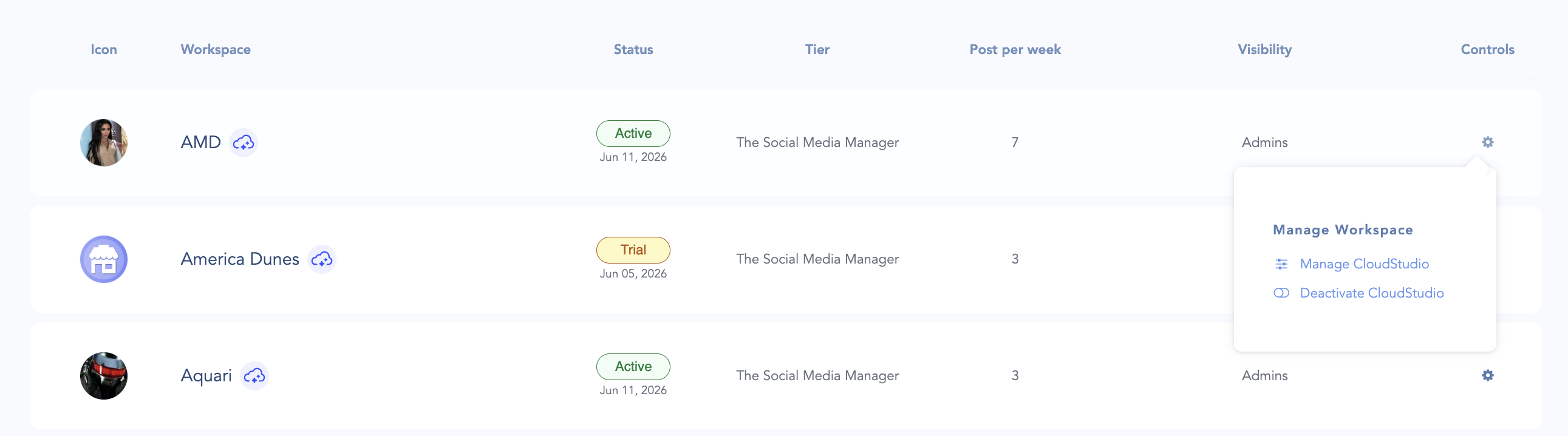
CloudStudio is managed from your Agency View, where your team already organizes client workspaces.
From there, you can see where CloudStudio is active, enable it for a specific workspace, and manage access across the clients you choose to support with AI-assisted fulfillment.
You can also activate a free trial on a workspace before committing.
The trial gives you 10 free social posts delivered directly into that workspace’s content library, so you can see what CloudStudio produces for a real brand in your account. That means you can test the workflow, review the quality, evaluate the campaign direction, and decide how it fits your agency’s service model before rolling it out more broadly.
This was important to us.
We did not want CloudStudio to be something agencies had to understand in theory. We wanted agencies to be able to try it inside the platform, with a real client or brand, and see how the content fits into their existing workflow.
A Smarter Intake Process
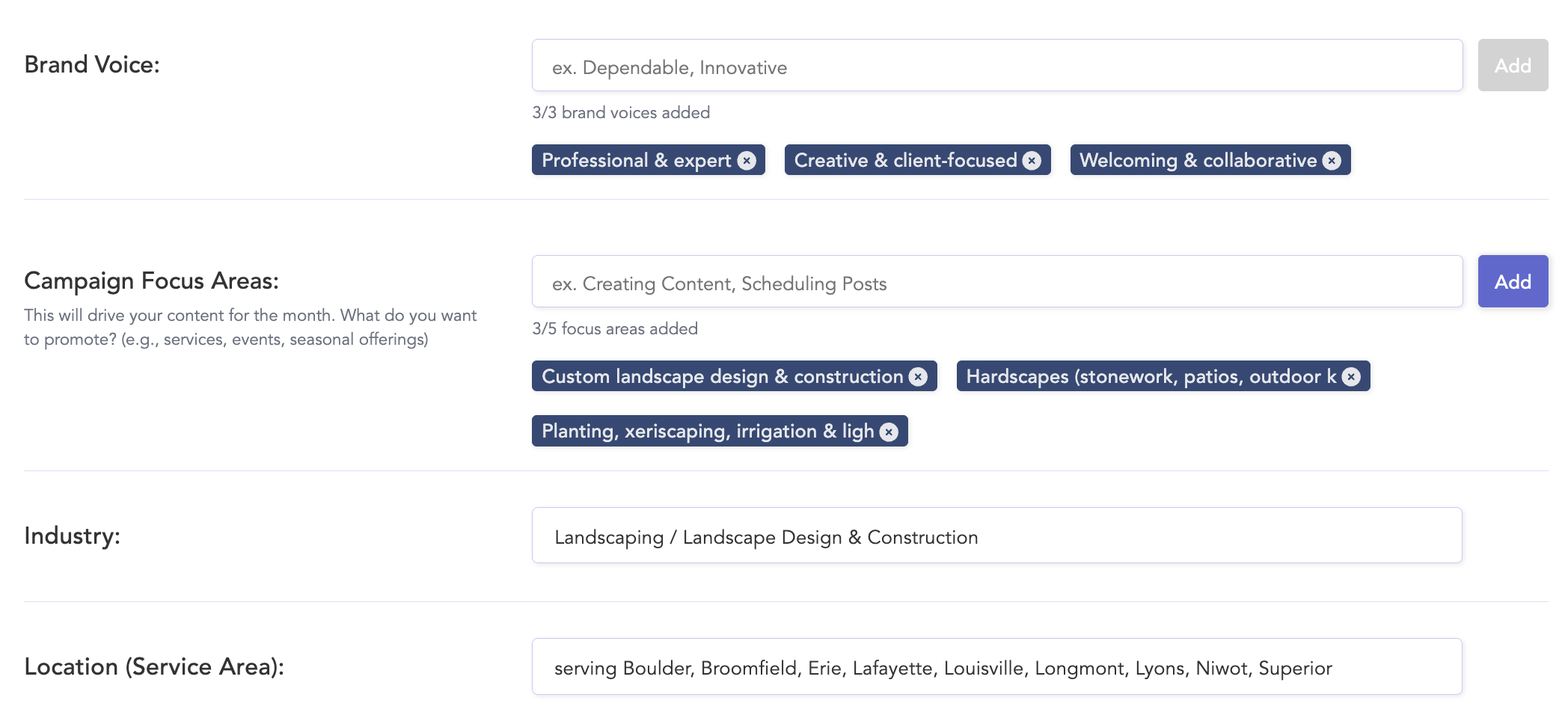
Great AI-generated content starts with great context.
That is why CloudStudio begins with a detailed intake process designed to help the system understand the client’s brand, audience, offerings, content goals, visual style, and campaign direction before generating anything.
But we also knew agencies do not want to spend hours filling out forms for every client.
So we built an AI-powered auto-complete option into the intake experience.
You can enter the brand’s website, and CloudStudio will intelligently populate the intake form with relevant information about the brand’s voice, target audience, product or service offerings, and campaign focus areas.
This gives your team a strong starting point quickly.
From there, you can review, refine, and adjust the details to make sure the brand direction is accurate. The result is a setup process that is both efficient and controllable. AI handles the initial research and structure, but your team still has final say over the details that matter.
Custom CTAs That Match the Client’s Goals
Calls to action are one of those small details that can make or break recurring social content.
Some clients want to drive website visits. Some want phone calls. Some want consultation requests. Some want quote requests. Some want people to book online, visit a location, download a resource, or learn more about a specific service.
CloudStudio lets you customize the types of CTAs you want included in a client’s social content, including the wording and the destination URL or phone number.
You can also control how often those CTAs appear.
This matters because not every post should sell. Some posts should educate. Some should build trust. Some should highlight a product or service. Some should be community-focused. Some should simply keep the brand visible.
By giving agencies control over CTA language and frequency, CloudStudio helps produce content that feels more intentional and less repetitive.
Flexible Visual Styles
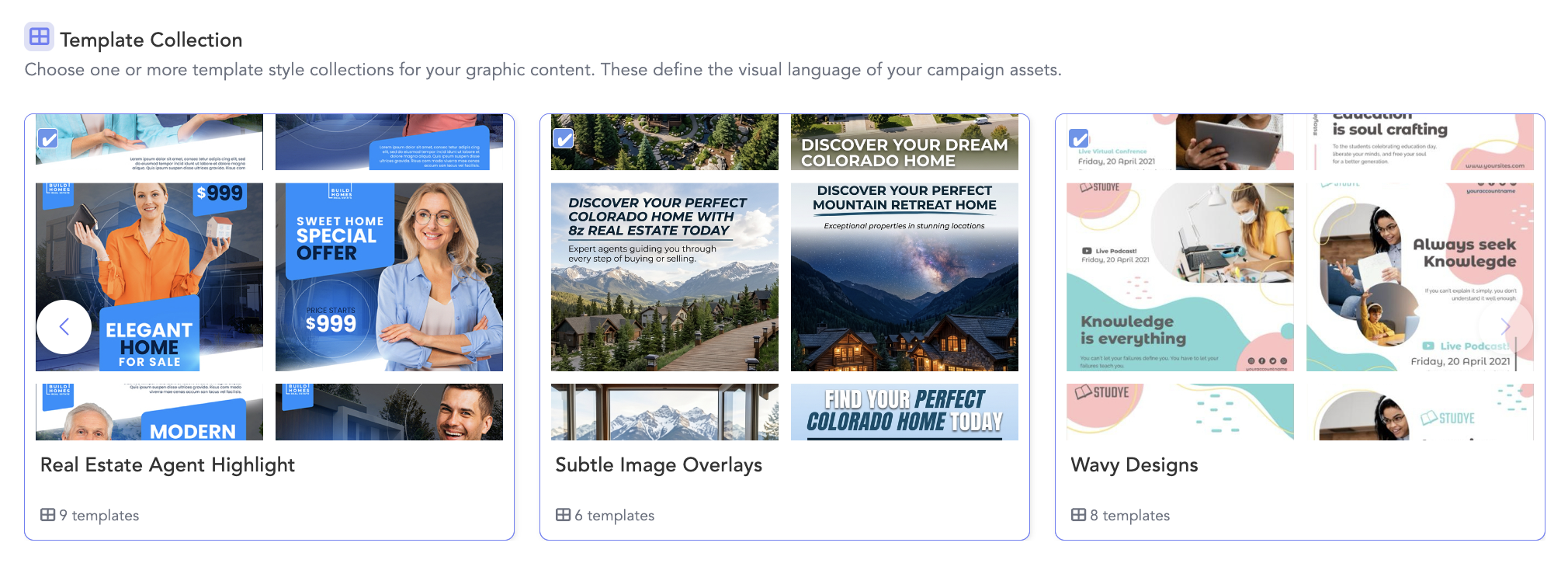
Social content does not have one universal look.
Some brands need polished graphic-style posts with clean layouts, bold typography, and branded design direction. Others need more realistic imagery that feels natural, photographic, or product-focused. Many need a mix of both.
CloudStudio gives agencies control over that visual direction.
During setup, you can choose whether the client’s content should lean toward graphic-style visuals, photorealistic visuals, or a mix of both. If you want a blended approach, you can use a slider to decide how much of each style you want in the content mix.
For graphic-style posts, CloudStudio includes a template library that helps guide the visual direction of the content. Agencies can browse different styles and choose templates that match a client’s brand, industry, or general vibe, whether that is minimalist, retro, bold, clean, playful, professional, or something else entirely.
This gives agencies a more reliable way to maintain visual consistency.
Instead of generating disconnected images from scratch every month, CloudStudio uses your selected creative direction to guide the output and keep the content aligned with the brand’s look and feel.
Captions That Actually Sound Like the Brand
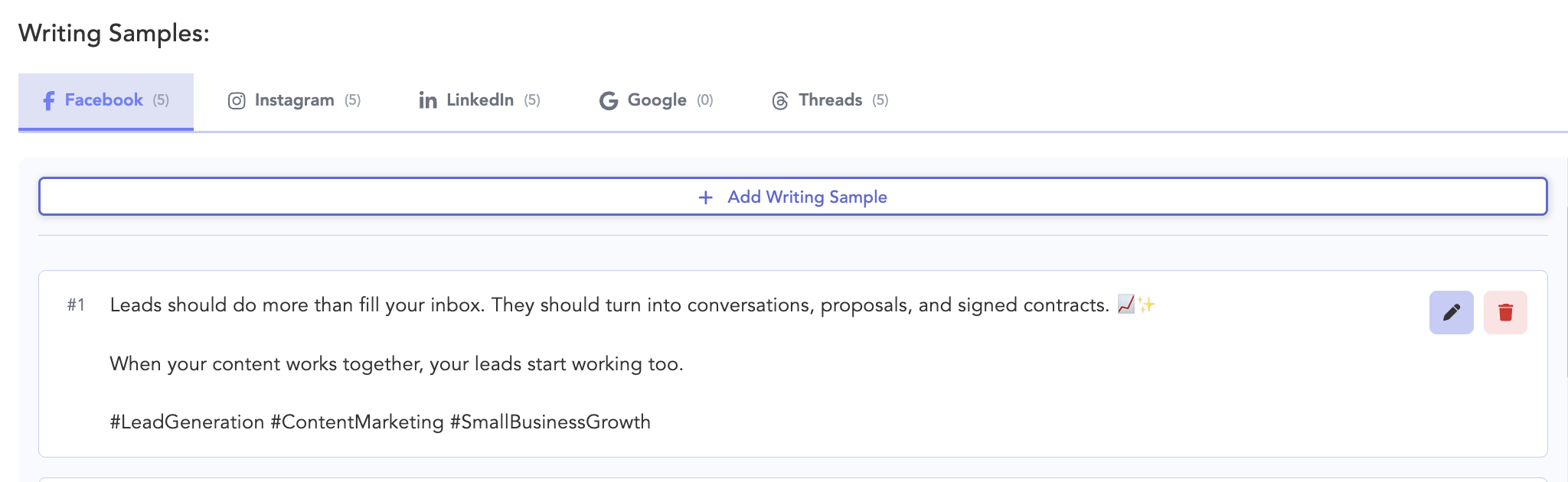
Captions are often where generic AI content falls apart.
A post might be technically correct, but still feel wrong. Too long. Too short. Too promotional. Too stiff. Too casual. Too many emojis. Not enough personality. Too many hashtags. No clear point of view.
CloudStudio includes several features designed to help captions better match the client’s actual voice.
First, you can choose simple preferences like whether the client’s posts should include hashtags or emojis. These toggles make it easy to set baseline expectations without overcomplicating the process.
You can also add custom caption guidelines. For example:
“Always mention our product guarantee.”
“Keep captions under 100 characters.”
“Use a friendly but expert tone.”
“Avoid slang.”
“Mention same-day service when relevant.”
These instructions help CloudStudio account for the kinds of client-specific details that are easy to miss in generic content generation.
We also built an Enhance Brand Voice feature to make this even stronger.
With Enhance Brand Voice, CloudStudio can search recent social posts from the client’s linked social accounts. Your team can select existing posts with captions that best match the brand’s voice, and those examples are used to guide future caption length, style, tone, and phrasing.
This is a practical way to move beyond abstract brand voice descriptions.
Instead of simply saying a brand should sound “friendly” or “professional,” your team can show CloudStudio real examples of what the brand already sounds like when it is working well.
That helps future content get closer to publish-ready on the first take.
A Reference Image Catalog for Better Product and Brand Accuracy
Visual accuracy matters, especially for clients with specific products, services, locations, facilities, team members, or brand assets that should appear in their content.
CloudStudio includes a Reference Image Catalog to help with this.
The catalog can be auto-filled from a client’s library to extract a product catalog and make it easier to feature the right products in social posts. This helps ensure that CloudStudio is not just generating attractive visuals, but is producing content that reflects what the client actually offers.
For agencies, this is an important quality-control layer.
It helps bridge the gap between generic image generation and client-specific creative output. The more relevant visual context CloudStudio has, the more useful the finished content becomes.
Monthly Campaign Briefs Before Content Is Created
Once intake is complete, CloudStudio generates a campaign brief for the client’s next month of social content.
This brief captures the strategic direction before posts are created. It outlines the planned content pillars, tone and voice, creative guidelines, target audience, and campaign focus areas for the upcoming month.
The brief can work well on its own, but it is also designed to be reviewed.
A quick pass through the campaign brief before approving content generation can make a major difference in how well the final posts fit the client. It gives your team a chance to adjust direction before the content is produced, rather than cleaning everything up afterward.
The campaign brief also refreshes each month.
That means CloudStudio is not simply repeating the same plan over and over. It can adapt based on what is working, upcoming seasonality, updated priorities, and the evolving needs of the client’s social presence.
This monthly brief gives agencies a structured way to keep recurring content aligned with strategy while still automating much of the planning work that usually slows teams down.
Content Generated, Human-Reviewed, and Delivered in About 30 Minutes

After the campaign brief is approved, CloudStudio generates the client’s social content and sends every post through a human quality review. In about 30 minutes, the reviewed content is delivered directly into the client’s workspace. Your team receives an email notification when it is ready, and the posts can also be found directly in the content library, approvals tab, and social calendar.
The content is already scheduled at optimal times and marked pending approval.
Each post includes platform-specific captions, so your team is not stuck manually adjusting every caption for every network.
This is where CloudStudio starts to feel less like a content generator and more like a fulfillment system.
The output does not land in a separate document, spreadsheet, or disconnected AI workspace. It arrives inside Cloud Campaign, where your team can review it, revise it, approve it, collaborate on it, and publish it through the same platform you already use.
AI Revisions & Approvals
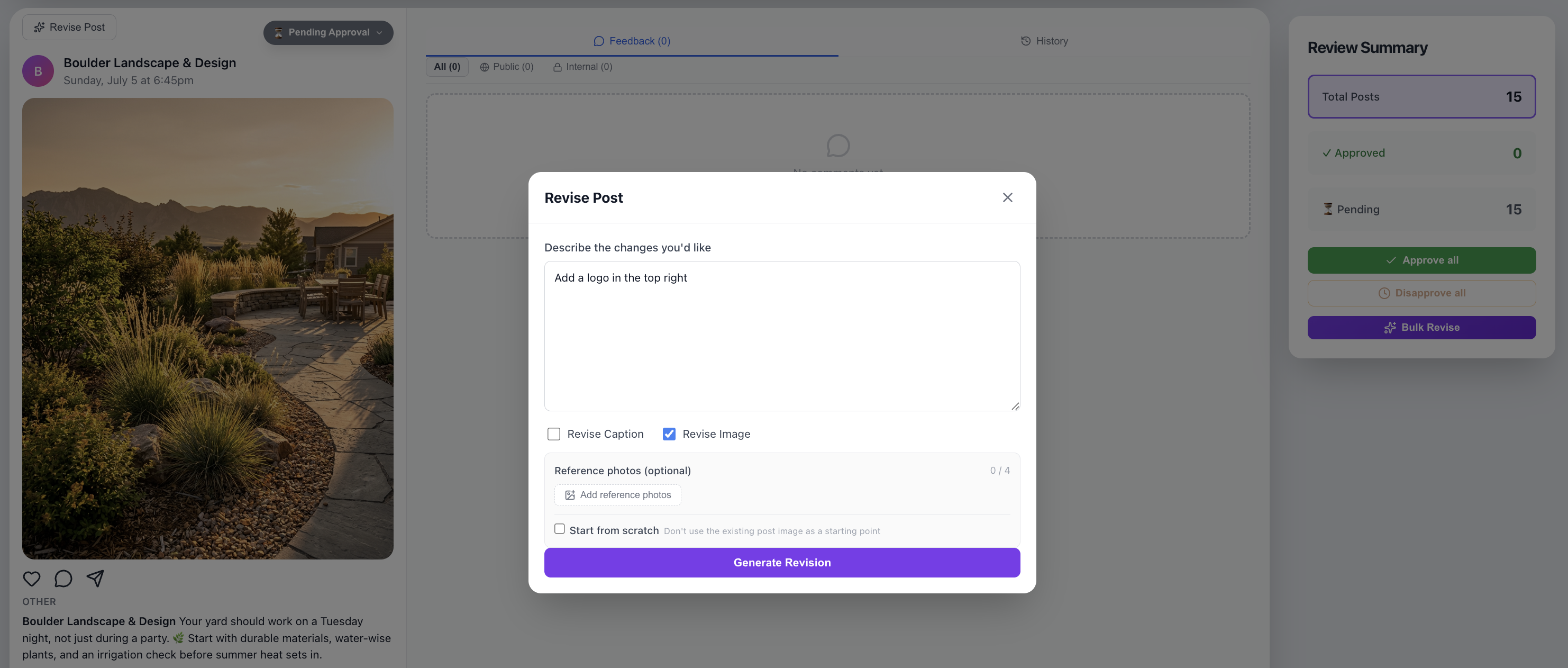
One of the most exciting platform enhancements launching alongside CloudStudio is our updated AI Revisions & Approvals dashboard.
When your CloudStudio content is delivered, the email includes a link to this dashboard, where your team can review the content and make simple revisions instantly.
For example, you might ask CloudStudio to:
“Move the CTA button to the center of the graphic.”
“Remove the person from the image.”
“Make the caption shorter.”
“Use a more professional tone.”
“Change the image to feel more seasonal.”
These types of edits can be handled directly in the approvals experience, giving your team a faster way to refine content without sending it back through a separate design or writing workflow.
We also designed the approvals experience carefully around permissions.
Admins and brand managers must be logged in to edit content. That means your internal team keeps control over revisions, version history, and production-level changes.
Clients can still be granted access through a tokenized approval link, with no login required. They can review content, leave comments, approve posts, or disapprove posts, but they cannot see internal notes, make edits, or view revision history.
That separation matters.
Agencies need a client-friendly approval experience, but they also need internal control. CloudStudio’s AI Revisions & Approvals dashboard is designed to support both.
Once content is approved, it publishes at the already-optimized time on the client’s social calendar.
Everything Stays Inside Cloud Campaign
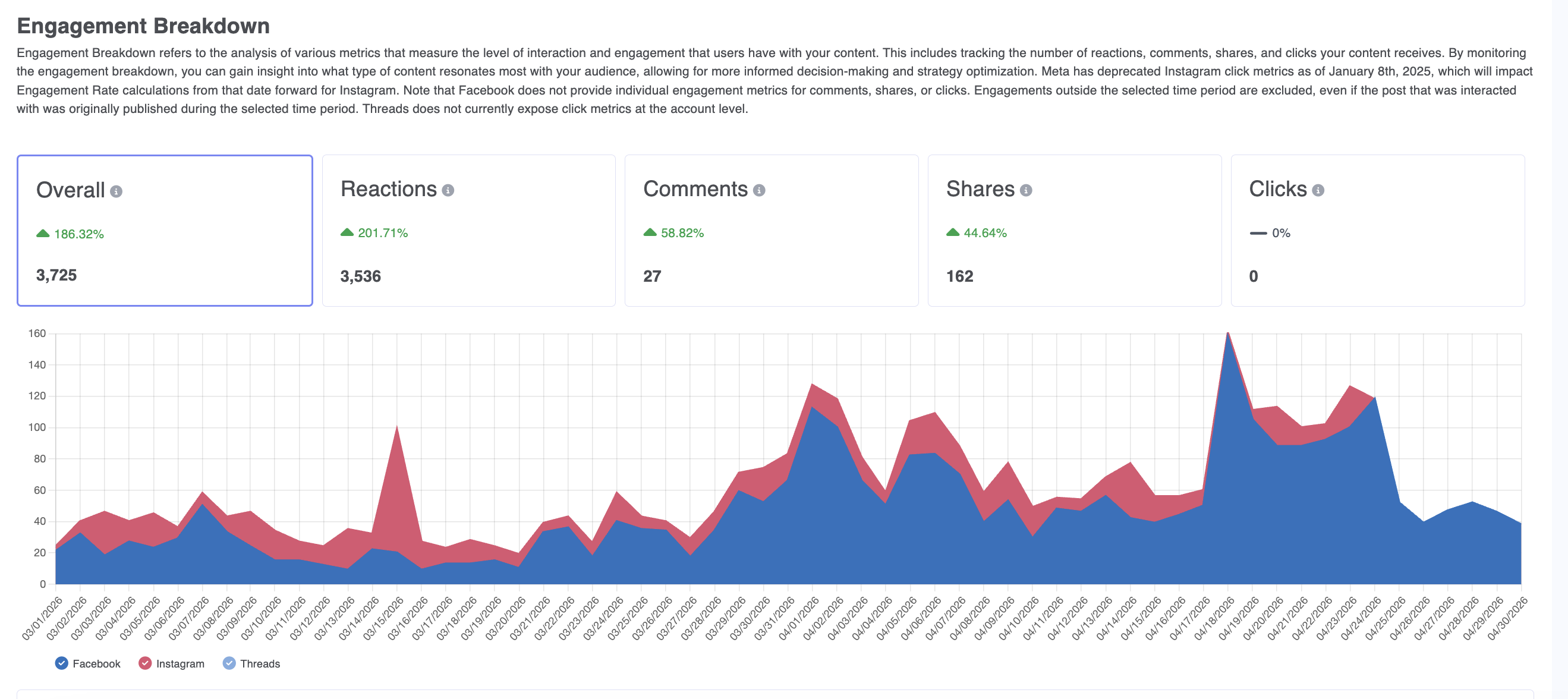
After content is created, reviewed, approved, and scheduled, the rest of the client lifecycle continues inside Cloud Campaign.
After approval and scheduling, the rest of the client lifecycle continues in Cloud Campaign: publishing, community management, analytics, reporting, and ongoing workspace organization.
This is one of the biggest reasons we believe CloudStudio is different from standalone AI tools.
It does not stop at content creation.
The real work of social media management continues after a post is written. Someone still needs to approve it, schedule it, publish it, monitor engagement, respond to comments and messages, evaluate performance, and report back to the client.
CloudStudio was built inside Cloud Campaign because we believe AI-assisted content creation should be connected to the rest of the workflow.
Otherwise, agencies are still left stitching together disconnected tools.
A Better Way to Scale Social Media Fulfillment
CloudStudio is our hedge on where we believe the agency business is going.
We do not believe the best agencies will simply automate everything and walk away. We also do not believe the old way of manually producing every recurring social post from scratch will remain the best use of agency talent.
The future is likely somewhere in between.
Agencies will need systems that automate the repetitive work while preserving strategic control. They will need tools that understand brand context up front, generate strong first drafts, support human review, enable fast revisions, and connect directly into publishing, approvals, reporting, and engagement workflows.
That is what we built CloudStudio to do.
It gives agencies a way to keep clients active on social media without building a traditional content production team around every account. It helps teams protect their time for strategy, creative direction, client relationships, campaign planning, and higher-value marketing work.
It also gives agencies a way to compete.
Smaller agencies can offer more complete social media services without overextending their team. Growing agencies can support more clients with a more repeatable delivery model. Established agencies can create a more efficient baseline content layer while reserving custom creative work for the moments that deserve it most.
CloudStudio is not meant to replace the agency.
It is meant to give the agency more leverage.
Try CloudStudio with 10 Free Social Posts
The best way to understand CloudStudio is to see what it creates for a real brand.
For a limited time, we are offering 10 free social posts for one brand you manage, so you can see how CloudStudio turns brand details into ready-to-review social content.
If you are already a Cloud Campaign customer, you can activate a free trial of CloudStudio from your Agency View on any workspace you choose. Your 10 free posts will be delivered directly into that workspace’s content library, where you can review, revise, approve, and schedule them through your existing workflow.
If you are not yet using Cloud Campaign, you can request your 10 free posts and see how CloudStudio helps agencies automate social media fulfillment while keeping the control, quality, and workflow structure that client work requires.
CloudStudio is built for agencies that want to scale smarter.




Want 10 free social posts for your client or brand?
CloudStudio helps automate your social presence by turning your brand, website, and goals into ready-to-post content. Share your info and we’ll show you what it can create.

































.png)

.png)
.png)
.png)
.png)
.png)
.png)
.png)
.png)
.png)
.png)
.png)
.png)
.png)






.png)





























.png)